

Shared Hosting vs VPS Hosting: Which One Should You Choose? (2026 Guide)
August 1, 2026 | by anisurrahaman235f@gmail.com
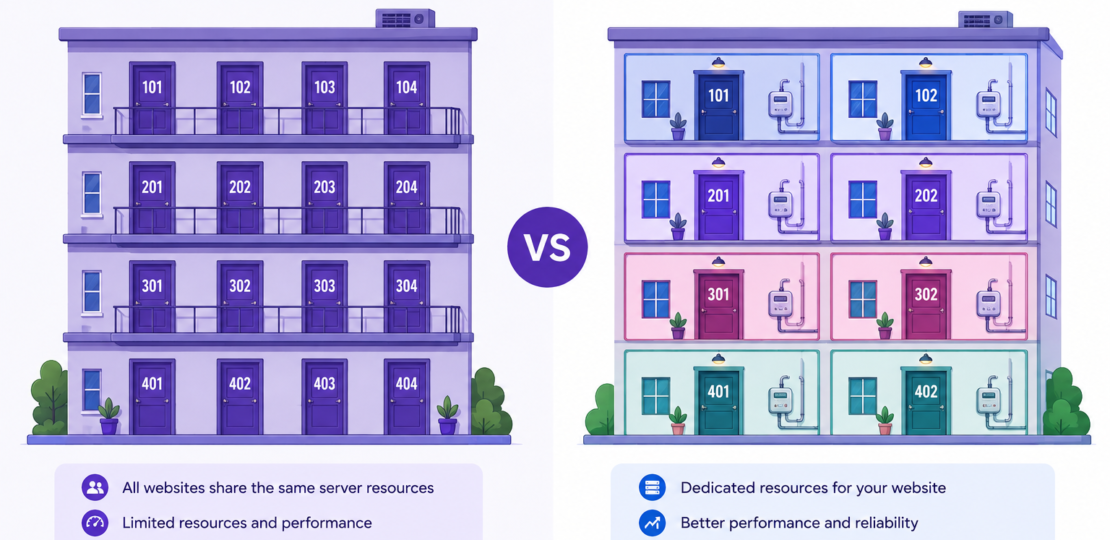
Sooner or later, almost every website owner runs into this exact decision. You started with the cheapest hosting plan available, your site grew a little, and now someone — a developer, a forum post, or your own slowing load times — is telling you it might be time to move to a VPS. But is it actually worth it, or is that just marketing pressure to spend more money? This guide breaks down the real, current differences between shared hosting and VPS hosting so you can make that call with actual numbers behind it, not guesswork.
What Shared Hosting Really Means
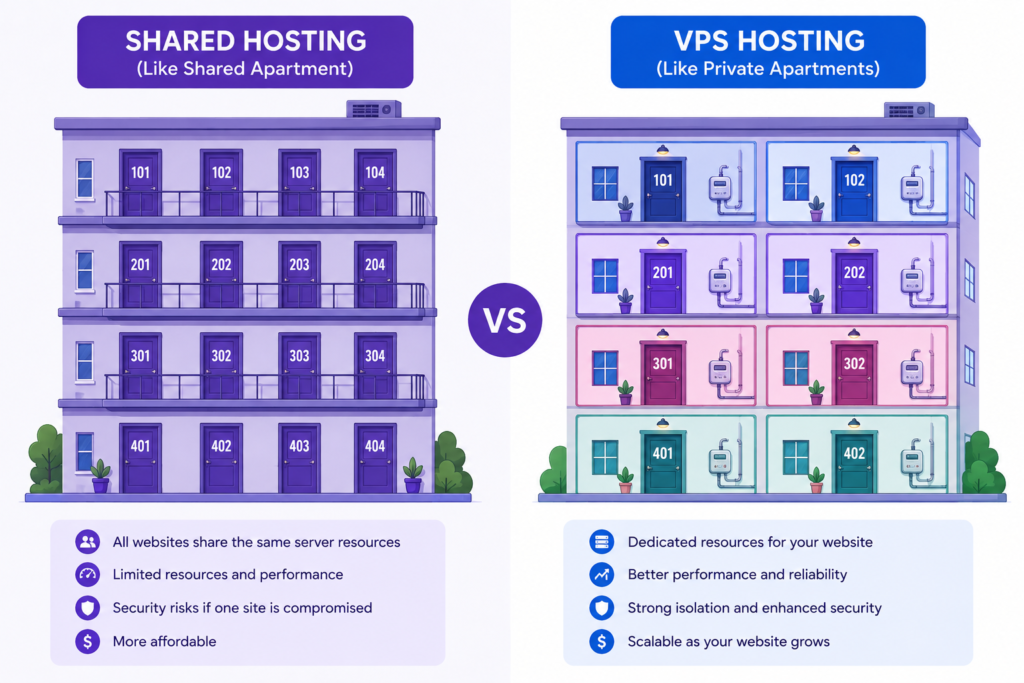
Shared hosting works exactly the way it sounds. Your website sits on a physical server alongside potentially hundreds of other websites, all pulling from the same pool of CPU power, RAM, and storage. The hosting company manages the server entirely — operating system updates, security patches, hardware maintenance — so you never have to touch anything technical. You upload your files, and the provider handles the rest.
This arrangement is what makes shared hosting so cheap. Because the cost of running the physical server is split across every website on it, providers can charge just a few dollars a month per customer. The tradeoff is that your website’s performance is not fully in your own hands — if another site on the same server suddenly gets a huge traffic spike, your site can slow down too, even though you did nothing differently.
What VPS Hosting Really Means
A VPS, or Virtual Private Server, also starts with a single physical machine shared among multiple customers, but the similarity ends there. Using virtualization software, that physical server is divided into several completely isolated virtual machines, each with its own guaranteed slice of CPU cores, RAM, and storage. Your neighbors on the same physical hardware cannot eat into your resources no matter how much traffic they get, because your portion is reserved specifically for you.
VPS plans come in two flavors: managed, where the provider still handles updates, security, and monitoring for you, and unmanaged, where you get full root access and are responsible for configuring and maintaining the server yourself. Managed VPS is the more realistic option for most beginners moving up from shared hosting, since unmanaged VPS assumes real server administration skills.
Real 2026 Pricing: What You Actually Pay
Pricing is often the first thing people compare, and the gap between the two options has narrowed slightly but is still significant. As of 2026, entry-level shared hosting plans typically run somewhere between $1.99 and $10 per month, depending on the provider and billing term length. VPS pricing starts noticeably higher, with basic managed plans generally beginning around $5 to $10 per month and scaling up toward $50 to $100 per month for more powerful managed configurations. Self-managed VPS plans from budget-focused providers can start lower, sometimes close to $2.50 per month, but that price reflects raw, unmanaged infrastructure without the support layer that most non-technical users actually need.
There is also a cost factor that catches many people off guard: bandwidth. Some VPS providers include a set monthly data transfer allowance and then charge per gigabyte once you exceed it, while others offer unmetered bandwidth as part of the base price. This detail rarely shows up in headline pricing comparisons but can meaningfully change the real monthly cost for a site with unpredictable traffic.
Performance: Where the Real Difference Shows Up
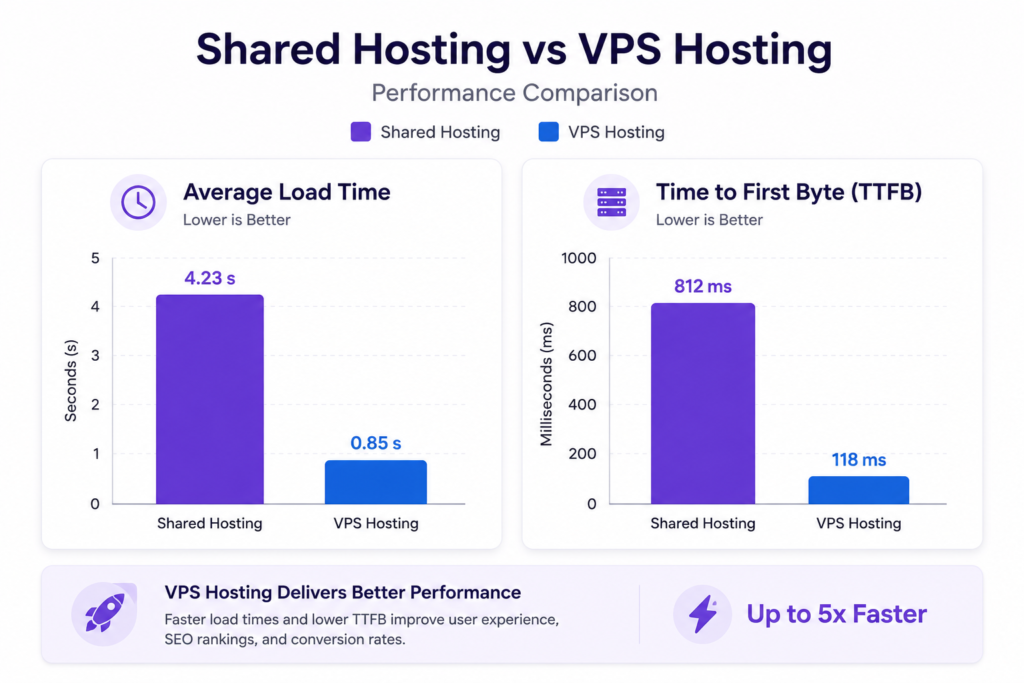
This is where the shared-vs-VPS decision usually gets settled in practice. Because shared hosting servers are often oversold, meaning far more websites are placed on a server than would comfortably fit if every site used its full resource allocation at once, performance can vary noticeably depending on what else is happening on that same machine at any given moment.
VPS hosting avoids this problem structurally, since your resources are reserved rather than shared on a best-effort basis. Independent benchmarking compiled across multiple hosting review sites has found that websites hosted on VPS plans tend to load meaningfully faster than the same website running on shared hosting, particularly during periods of high traffic, and Time to First Byte — a key measure of how quickly a server starts responding to a request — is consistently faster and more stable on VPS compared to equivalent-priced shared plans.
For a small brochure website that gets a steady trickle of visitors, this difference may barely be noticeable. For an online store, a growing blog, or any site where slow loading during a traffic spike directly costs you sales or search rankings, the performance gap becomes a real business consideration rather than a technical curiosity.
Security: A Bigger Gap Than Most People Realize
Security is one of the most underrated differences between the two hosting types. On a shared server, your website exists in the same environment as every other tenant on that machine. If one of those other websites gets compromised through an outdated plugin or weak password, malware can sometimes spread across the shared environment and affect neighboring sites, even ones that were configured perfectly. Shared hosting customers also typically cannot install a custom web application firewall, change PHP handler settings, or configure server-level intrusion prevention tools, since doing so could affect every other site on the same machine.
VPS hosting isolates you from that risk almost entirely. Because your virtual server is walled off from every other customer’s environment, a security issue on someone else’s site has no direct path to affecting yours. VPS users, particularly on self-managed plans, also have the freedom to install and configure their own security tools, which is valuable for websites handling sensitive customer data, payment information, or login credentials.
Control and Customization
Shared hosting is intentionally limited in terms of customization, because the provider needs every website on the server to play by the same basic rules to keep the whole system stable. You typically cannot choose your own software stack, install custom server-level caching tools, or run background processes beyond what the hosting control panel allows.
VPS hosting removes most of those restrictions. You can install the specific PHP version your application needs, configure caching layers like Redis or OPcache yourself, run custom scripts or background jobs, and generally shape the server environment around your website’s actual requirements rather than a one-size-fits-all template.
Signs You Have Outgrown Shared Hosting
There is no single traffic number that triggers an automatic upgrade, but a few practical warning signs tend to show up consistently:
- Your site slows down noticeably during traffic spikes, even though your own content hasn’t changed
- You are hitting resource limits or receiving warnings from your host about CPU or memory usage
- You need to install specific software, PHP extensions, or server configurations that your shared plan does not support
- Your website handles sensitive data (payments, logins, personal information) and you need stronger isolation
- You are running an online store or any site where downtime or slow loading directly costs you revenue
If none of these apply yet, staying on shared hosting is usually still the financially smarter choice. Moving to VPS before you actually need it just means paying for capacity you are not using.
A Practical Decision Framework
- Choose shared hosting if: you are launching a new website, running a personal blog, small portfolio, or early-stage business site, have a limited budget, and prefer zero server management responsibility.
- Choose managed VPS if: your site has grown past occasional slowdowns, you need more consistent performance during traffic spikes, you handle sensitive data, or you want more configuration flexibility without becoming a full-time server administrator.
- Choose unmanaged VPS if: you or someone on your team has genuine server administration experience and you want maximum control over every aspect of your hosting environment.
Frequently Asked Questions
Can I switch from shared hosting to VPS later without losing my website?
Yes. Moving from shared hosting to VPS is one of the most common upgrade paths in web hosting, and most reputable providers offer migration assistance or a straightforward plan-change process that does not require rebuilding your site from scratch.
Is VPS hosting too technical for a beginner?
Managed VPS hosting is designed specifically to bridge this gap — the provider still handles server maintenance and security, so you get better performance and isolation without needing deep technical expertise. Unmanaged VPS, on the other hand, does require real technical comfort.
Does VPS hosting guarantee my site will never slow down?
No hosting type guarantees perfect performance at all times, but VPS hosting removes the specific risk of other websites on the same server affecting your resources, which is the most common cause of unpredictable slowdowns on shared hosting.
Is VPS hosting worth it for a small website with low traffic?
Usually not immediately. If your site is small and steady, shared hosting is generally the more cost-effective choice until your traffic, technical needs, or security requirements genuinely outgrow it.
Final Thoughts
Shared hosting and VPS hosting are not competing for the same customer — they are built for different stages of a website’s life. Shared hosting remains the sensible, affordable starting point for most new websites, while VPS hosting earns its higher price tag once a site’s traffic, performance needs, or security requirements genuinely demand dedicated resources. The smartest approach for most people is not picking one forever, but recognizing the specific signs that signal it’s time to move from one to the other — and making that switch based on your site’s actual needs rather than pressure to upgrade before you’re ready.
RELATED POSTS
View all

Hostinger vs Bluehost: Complete Hosting Comparison (2026)
August 1, 2026 | by anisurrahaman235f@gmail.com
Best Hosting for Small Business Websites in 2026
August 2, 2026 | by anisurrahaman235f@gmail.com

What Is Hostinger? A Complete Beginner’s Guide (Updated for 2026)
August 1, 2026 | by anisurrahaman235f@gmail.com