

How to Choose the Best Web Hosting for Your Website (2026 Guide)
August 1, 2026 | by anisurrahaman235f@gmail.com
Picking a web host feels simple until you actually start comparing providers. Every company claims to offer “99.9% uptime,” “blazing speed,” and “24/7 support,” yet the experience of actually running a website on their servers can be wildly different from what the marketing page promises. If you have ever watched your site crawl during a traffic spike, or spent an hour on hold with a support team that couldn’t fix a basic DNS issue, you already know that hosting decisions have real consequences.
This guide breaks down exactly what matters when choosing a host in 2026, why some of the old advice no longer applies, and how to match a hosting plan to the actual size and goals of your project — not just the cheapest banner ad you saw.
Why Your Hosting Choice Matters More Than You Think
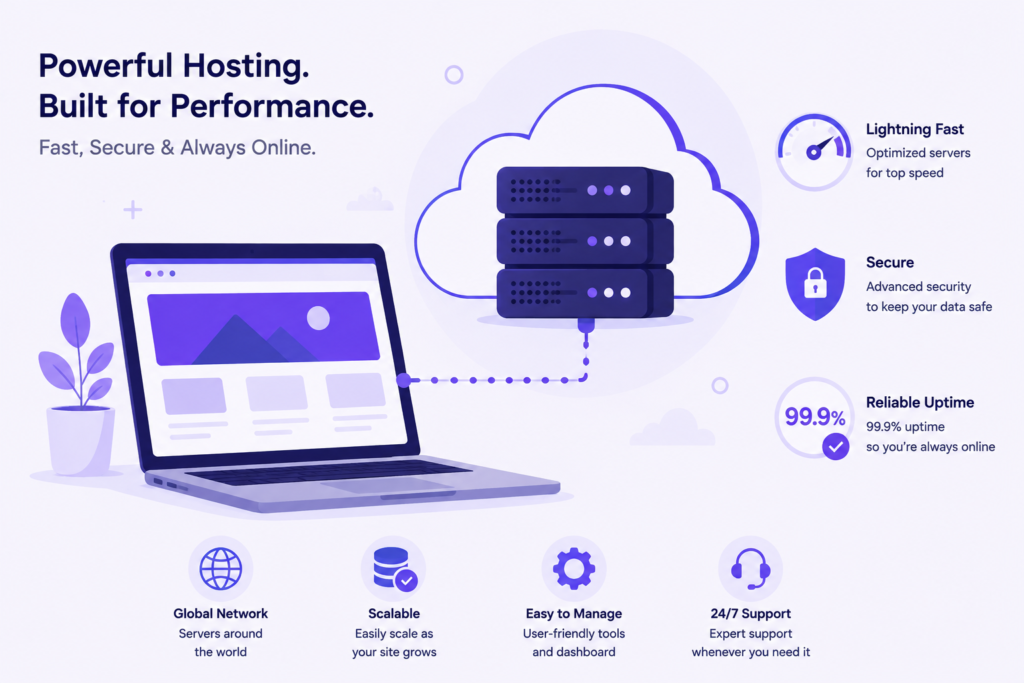
Web hosting is the foundation your entire website sits on. A slow, unreliable, or poorly secured server undermines everything else you do — your content, your design, your marketing spend. Search engines also factor server response time and uptime into ranking signals, so a weak host can quietly hurt your visibility even if your content is excellent.
Three consequences of a poor hosting choice show up almost immediately:
- Lost visitors during traffic spikes. If your server can’t handle sudden demand — say, your post goes viral or you run a sale — pages slow down or crash exactly when you need them most.
- Lower search rankings. Page speed and server stability are measured directly by search engines through Core Web Vitals, and a sluggish host makes it harder to pass those thresholds no matter how well you optimize your code.
- Security exposure. Outdated server software, poor isolation between accounts, and weak backup policies leave your site vulnerable to malware injections and downtime from attacks.
Understanding the Main Types of Web Hosting
Before comparing individual companies, you need to understand what you’re actually buying. Hosting isn’t one product — it’s a spectrum of infrastructure options, each suited to a different stage of website growth.
Shared Hosting
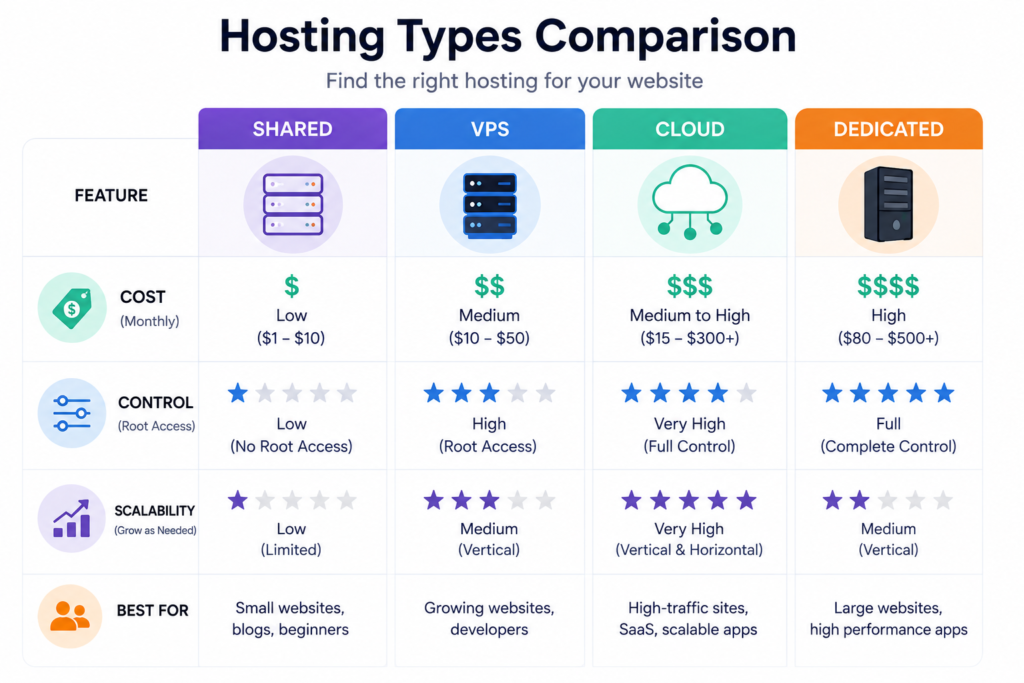
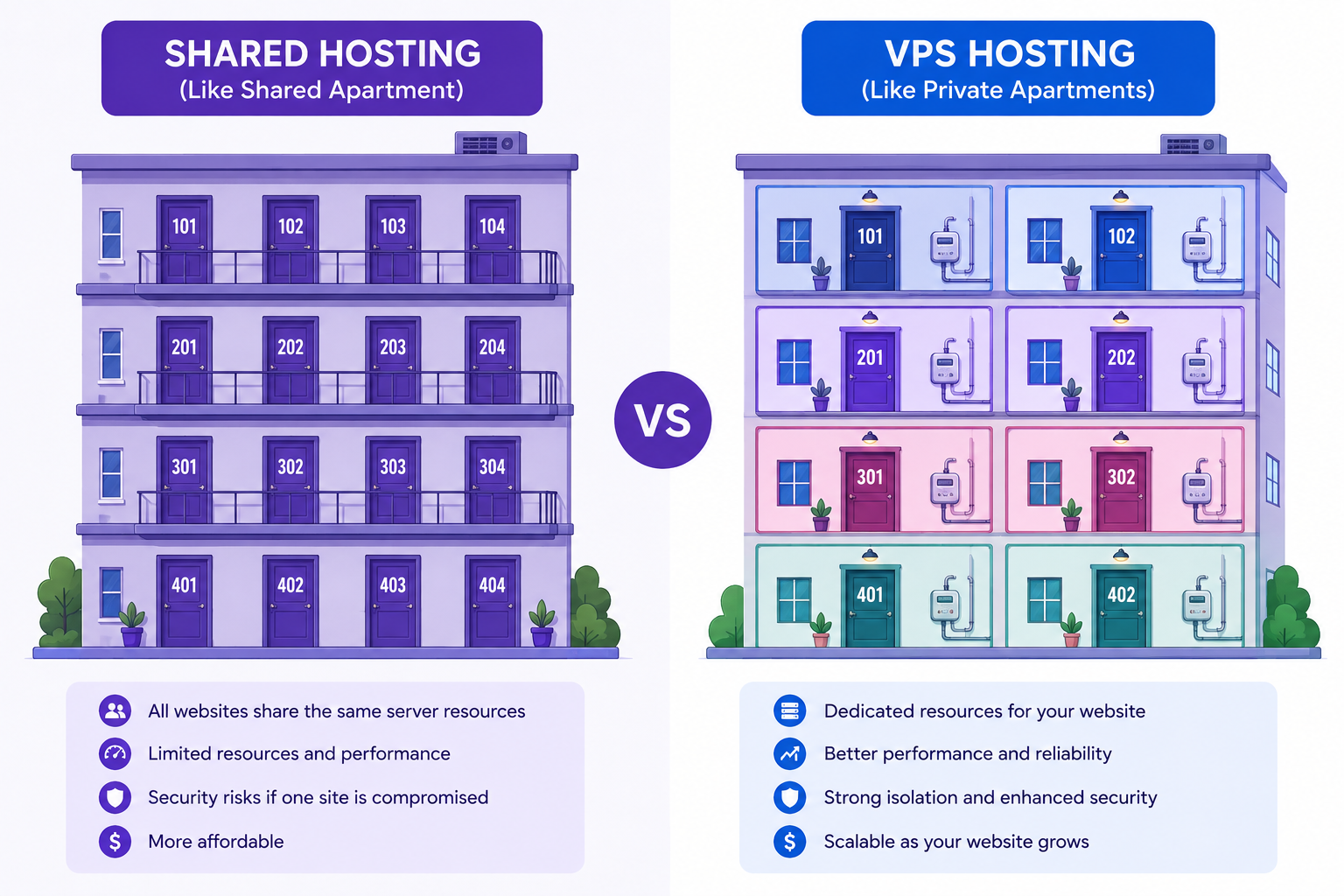
With shared hosting, your website lives on the same physical server as dozens or even hundreds of other sites, all splitting the same CPU, memory, and bandwidth. It’s the cheapest entry point, typically running a few dollars a month, and it usually comes bundled with a control panel, a free SSL certificate, and one-click installers for platforms like WordPress.
The tradeoff is predictable: performance dips when a neighboring site on the same server experiences a traffic surge or gets attacked, since resources aren’t isolated. Shared hosting works well for blogs, portfolios, and small business sites that expect modest, steady traffic — generally under 10,000 visits a month.
VPS (Virtual Private Server) Hosting
A VPS splits one physical machine into several virtual, isolated environments, each with guaranteed CPU cores, RAM, and storage. You’re no longer sharing resources unpredictably with strangers, and most VPS plans give you root access so you can install custom software or fine-tune server configurations.
This tier suits growing websites, online stores, and web applications that have outgrown shared hosting but don’t yet need an entire dedicated machine — roughly in the 10,000 to 100,000 monthly visitor range, depending on how resource-intensive the site is.
Cloud Hosting
Cloud hosting distributes your website across a network of interconnected servers rather than tying it to one physical machine. If one server in the cluster fails, another instantly picks up the load, which makes cloud hosting notably resilient. It also scales elastically — resources expand automatically during traffic surges and shrink back down afterward, so you’re not stuck over-provisioning for the one day a year you get extra visitors.
This flexibility comes with usage-based pricing in many cases, so costs can vary month to month depending on actual demand. Cloud hosting suits businesses with unpredictable or seasonal traffic patterns, viral marketing campaigns, or multiple sites that need centralized, scalable management.
Dedicated Hosting
With dedicated hosting, an entire physical server belongs to you alone. Nothing is shared, so you get maximum performance, full customization, and complete control over security configurations. It’s also the most expensive option and typically requires either a skilled in-house administrator or a managed-service add-on, since you’re responsible for maintaining the whole machine.
Dedicated servers make sense for large e-commerce platforms, high-traffic media sites, and applications with strict compliance or performance requirements that shared infrastructure simply can’t meet.
Key Factors to Evaluate Before You Buy
Once you know which category fits your project, use these criteria to compare specific providers within that category.
1. Uptime Guarantee
Look for a documented uptime commitment of at least 99.9%, backed by a service-level agreement rather than just a marketing claim. That figure translates to roughly 8.7 hours of downtime per year — anything meaningfully worse than that starts to hurt visitor trust and revenue. Check independent monitoring reports or third-party review sites rather than relying solely on the host’s own dashboard numbers.
2. Server Speed and Infrastructure
Ask what hardware the host actually runs. NVMe solid-state storage, modern CPU architecture, and adequate RAM allocation per account all affect how quickly your pages load. Also check whether the provider offers a content delivery network (CDN) integration, which caches your content across global edge locations so visitors far from the origin server still get fast load times.
3. Scalability
Your hosting needs today won’t match your needs in a year if the site succeeds. Choose a provider that lets you upgrade your plan — more storage, more RAM, more bandwidth — without a painful migration process. Cloud and VPS providers generally make this far easier than rigid shared hosting plans.
4. Security Features
At minimum, confirm the plan includes a free SSL certificate, regular automated backups, malware scanning, and a firewall. For stores handling payment data, ask specifically about PCI compliance support. Providers that isolate accounts from one another (a stronger feature on VPS and cloud plans) also reduce the risk that a neighboring site’s compromise spreads to yours.
5. Customer Support Quality
Test support before you commit if possible — send a pre-sales question through live chat and time the response. Look for 24/7 availability through multiple channels (chat, ticket, phone), and check whether support staff can actually resolve technical issues or simply redirect you to documentation. Reviews mentioning long wait times or scripted responses are a red flag.
6. Pricing Transparency and Renewal Rates
Many hosts advertise a steep introductory discount that jumps significantly at renewal. Always check the renewal price, not just the first-term price, and read the refund policy closely. A generous money-back guarantee (30 to 45 days is common) lets you test the service risk-free.
7. Data Center Location
Choose a data center geographically close to your main audience, since physical distance adds latency. If your visitors are spread globally, prioritize a host with multiple data center regions or strong CDN integration rather than a single fixed location.

Matching Hosting to Your Website’s Stage
A useful way to think about hosting is by traffic volume and project maturity rather than by brand names:
- Personal blog or portfolio, under 5,000 monthly visits: Shared hosting is sufficient and cost-effective.
- Small business site, 5,000–10,000 monthly visits: Shared hosting with good support, or entry-level managed WordPress hosting if you want automated updates and backups handled for you.
- Growing site or small online store, 10,000–50,000 monthly visits: VPS hosting, which gives isolated resources and room to scale without a full migration.
- Established e-commerce or high-traffic content site, 50,000+ monthly visits: Cloud or dedicated hosting, depending on whether your traffic is steady or highly variable.
If you’re unsure which bracket you’ll land in within the next year, it’s generally smarter to start one tier above your current needs on infrastructure that scales easily (cloud or VPS) rather than migrating hosts later, which can cause downtime and lost SEO signals during the transition.
Managed vs. Unmanaged Hosting
A separate but important decision is whether you want a managed or unmanaged plan. Managed hosting means the provider handles server updates, security patching, backups, and performance tuning — ideal if you don’t have server administration experience. Unmanaged hosting hands you full control (and full responsibility) over the server environment, which is better suited to developers and teams with the technical skill to maintain it themselves. Choosing unmanaged hosting without that expertise often means paying for capability you can’t use while leaving your site exposed to misconfigurations.
Emerging Considerations for 2026
A few trends are increasingly shaping hosting decisions this year:
- Energy-efficient and green data centers are becoming a genuine differentiator, with more providers publishing carbon-neutral or renewable-energy commitments alongside their uptime stats.
- AI-assisted performance monitoring is now built into several hosting dashboards, automatically flagging slow queries, plugin conflicts, or unusual traffic before they cause downtime.
- Per-second or usage-based billing on cloud and VPS platforms has become more common, letting smaller projects pay closer to their actual resource consumption instead of a flat monthly rate regardless of usage.
- Edge computing integration is spreading beyond enterprise plans, giving even smaller sites access to distributed processing that used to be reserved for large-scale applications.
None of these should be the deciding factor on their own, but they’re worth asking about when comparing otherwise similar plans.
A Practical Checklist Before You Sign Up
Before entering payment details with any provider, confirm the following:
- The uptime guarantee is documented in a service-level agreement, not just advertised.
- You know the renewal price, not just the introductory rate.
- Backups are automated and restorable without extra fees.
- Support is reachable 24/7 through a channel you’re comfortable using.
- The plan can scale (upgrade path) without forcing a full account migration.
- SSL, firewall, and malware scanning are included, not upsold separately.
- The data center location matches where most of your visitors are.
- There’s a fair refund window in case the service doesn’t meet expectations.
Final Thoughts
There’s no single “best” web host — only the best fit for your website’s current size, technical comfort level, and growth plans. A personal blog doesn’t need dedicated server power, and a fast-growing online store shouldn’t be squeezed onto basic shared hosting. Start by honestly assessing your traffic and technical skill, then use the criteria above — uptime, speed, scalability, security, support, and transparent pricing — to compare a shortlist of providers rather than picking the first one with an attractive homepage discount.
Hosting is one of the few technical decisions on a website that’s genuinely worth spending real time researching, because switching later, while possible, always costs more time and risk than choosing carefully the first time.
RELATED POSTS
View all

Shared Hosting vs VPS Hosting: Which One Should You Choose? (2026 Guide)
August 1, 2026 | by anisurrahaman235f@gmail.com
Best Hosting for Small Business Websites in 2026
August 2, 2026 | by anisurrahaman235f@gmail.com

The Complete Beginner’s Guide to Launching Your First Website (2026)
August 2, 2026 | by anisurrahaman235f@gmail.com